
Podcasting in 2026 is large and still growing. Industry trackers put global monthly listeners somewhere between 620 and 670 million, depending on who is counting, and total show counts sit above four million. That is good news for demand and bad news for anyone hoping to be found by accident.
- 620–670 million global monthly podcast listeners in 2026, by different industry estimates
- 53% of weekly podcast consumers watch video versions, per Cumulus Media data
- 4 million+ podcasts exist, so a clear topic matters more than ever
The biggest change of the past two years is video. Apple Podcasts added video support in early 2026, joining YouTube and Spotify, so every major platform now treats video as a normal part of a podcast. You do not have to film your show. You do need to decide on purpose, which is step two below.
If you start this month, you can have a polished show live by the end of January 2027. Here is the path.
1. Define a show you can make for a year
Most podcasts do not fail because of bad microphones. They stop because the host ran out of things to say or ran out of energy. Before you buy anything, write three lines:
- Who it is for. A specific listener, such as “freelance designers in their first two years”, beats “creative people”.
- What they get. One promise you can keep every episode: a practical tip, an interview with a practitioner, a story, a news roundup.
- How it sounds. Solo, co-hosted or interview format. Solo is the cheapest to produce. Interviews give you guests who share your episodes with their own audience.
Then pick a name that says what the show is about, keep it short enough to say out loud, and check that the name is free on the podcast directories, YouTube and your social handles. Prepare square cover art at 3000 by 3000 pixels. It will be shown as a tiny thumbnail, so keep it bold and nearly text-free.
Test it: outline ten episode ideas before you commit. If you reach six and struggle, narrow the audience or widen the topic until the list comes easily.
2. Choose audio-only or video
Audio-only is still a legitimate way to launch, and most downloads from hosting platforms still arrive through audio feeds. Host-level data reported in 2026 puts Apple Podcasts at roughly 71 percent of audio downloads and Spotify at about 19 percent. Video adds a second discovery route, because YouTube recommends your episodes to people who have never heard of you, which RSS directories do not.
A practical rule: record video if it costs you almost nothing extra. A webcam, decent window light and a tidy background are enough. Skip it if filming would make you record less often. Consistency beats production value.
3. Get the gear that matters
Sound quality is the one area where listeners are unforgiving, so spend there first.
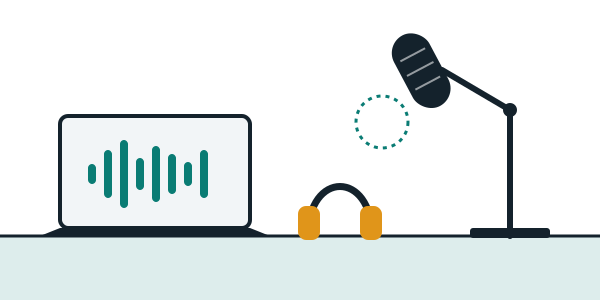
- A dynamic USB or XLR microphone. Dynamic mics pick up less room noise than condenser mics, which helps in an untreated bedroom or office.
- Closed-back headphones. They stop your own audio leaking back into the recording and let you hear problems as they happen.
- A quieter room. Record somewhere with soft surfaces: a closet full of clothes, a room with a rug and curtains. Turn off fans and move away from the fridge.
- Free editing software to start. Audacity and similar tools cover trimming, noise reduction and exporting. Many hosts and recording platforms also include basic editing.
- A remote recording tool for guests. Record each person’s audio locally rather than relying on a video call’s compressed signal. Riverside and several hosts offer this.
4. Record, edit and export
Work from an outline, not a script. Bullet points keep you natural, and a one-line cold open (the most interesting thing from the episode) hooks listeners before your intro.
- Length. Aim for the shortest length that serves the topic. For a new show, 20 to 40 minutes is a sensible range.
- Edit lightly. Cut long pauses, false starts and anything that wanders. Leave natural breathing and small imperfections.
- Loudness. A common target is about -16 LUFS for stereo or -19 LUFS for mono, so your show sits at a similar level to others on a listener’s phone.
- Export. MP3 at 128 kbps is the usual default for spoken word. Add ID3 tags with your show name and episode title.
- Transcribe. A transcript gives you show notes, searchable text for your website and captions for video clips.
Batch your recording. Making six to eight episodes before launch protects you from the early dip in motivation and lets you release on a steady schedule.
5. Pick a podcast host
A host stores your files and produces the RSS feed that every podcast app reads. It is the one part of your setup that is hard to swap later, so choose it with some care. Pricing and limits change often, so check each provider’s current plans before you commit.
| Host | Good for | Worth knowing |
|---|---|---|
| Spotify for Creators | First-time podcasters and video-first shows | Free audio and video hosting with built-in recording and a monetization dashboard. |
| Buzzsprout | Solo shows with a weekly audio schedule | Often recommended as the simplest paid starting point. |
| Transistor | Professional shows, teams and multi-show networks | Frequently ranked at the top for overall quality in 2026 comparisons. |
| Castos | WordPress sites and private podcasts | Native WordPress publishing and built-in private feeds. |
| Libsyn | Established creators who want a long track record | One of the longest-running hosts, with broad distribution. |
| Riverside | Recording, editing and hosting in one place | Strong for remote interviews with local recording per guest. |
One thing to check before you sign up: you should keep control of your RSS feed and be able to move it to another host with a redirect. Free tools that bundle hosting and distribution can make that harder, so read how migration works before your first episode.
6. Distribute everywhere listeners are
You upload once to your host. The host gives you an RSS feed, and you submit that feed to each directory. After the first approval, new episodes appear on their own.
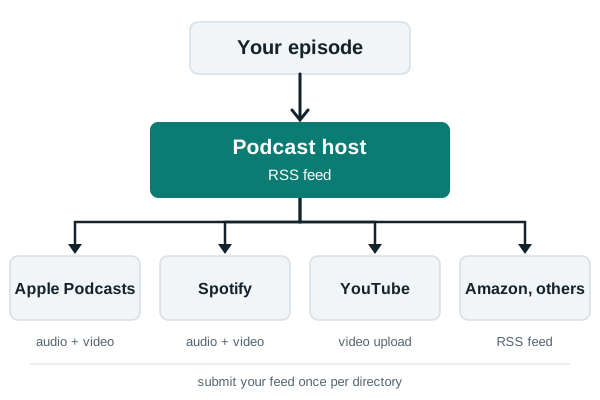
- Apple Podcasts. Submit your feed through Apple Podcasts Connect. Review can take a few days, so do it early.
- Spotify. Add your feed or publish through Spotify for Creators.
- YouTube. Upload full episodes as video, or a static cover with audio if you do not film. Create a podcast playlist so it is recognized as a show.
- Everything else. Amazon Music, iHeart and other apps accept the same feed. Many hosts submit to them for you.
7. Follow a 12-week launch plan
Starting the week of November 9, 2026 puts your launch in the week of January 25, 2027. The holidays sit in the middle, which is useful because batch recording is easy to do at home.
- Weeks 1–2 (Nov 9 – Nov 22): Concept. Write the three lines from step one, outline ten episodes, choose a name and check availability.
- Weeks 3–4 (Nov 23 – Dec 6): Gear and test. Buy or borrow equipment, record a test episode and listen on earbuds and a phone speaker.
- Weeks 5–8 (Dec 7 – Jan 3): Batch record. Produce six to eight episodes, edit and export them, and write show notes.
- Week 9 (Jan 4 – Jan 10): Host and cover art. Set up your host, upload episodes privately and finish your artwork and description.
- Week 10 (Jan 11 – Jan 17): Submit feeds. Send your RSS feed to Apple Podcasts and Spotify, and publish a short trailer.
- Week 11 (Jan 18 – Jan 24): Teasers. Cut short clips with captions, line up guests to share the launch and tell your email list or community.
- Week 12 (Jan 25 – Jan 31): Launch. Release three episodes at once. New listeners can binge, and the first downloads signal that the show is active.
8. Grow it and, later, earn from it
Treat growth as three search surfaces: the podcast apps, YouTube, and your own website. A website with show notes and transcripts gives Google and Bing something to index, which helps people find individual episodes long after release.
- Clip every episode. Two or three 30 to 60 second captioned clips per episode give you material for social feeds and YouTube Shorts.
- Swap with similar shows. Guest on another podcast with a matching audience, and ask people to trade recommendations.
- Ask for ratings once. A single mention near the end of an episode works better than repeating it.
- Hold off on ads. Sponsors want a consistent release history and steady downloads. Memberships, bonus episodes and newsletter sponsorships can come first for a small, loyal audience.
- Watch your analytics. Look at where listeners stop, which episodes bring new followers and which topics get shared.
Advertising money is moving into the format, with industry reports pointing to double-digit growth in 2026, although estimates differ between sources. The shows that benefit are the ones that stay on schedule long enough to build trust.
Pre-launch checklist
- Audience, promise and format written down
- Show name checked on directories and YouTube
- Cover art at 3000 × 3000 pixels
- Six or more episodes recorded and edited
- Loudness checked on a phone speaker
- Host chosen and RSS redirect policy read
- Feed submitted to Apple Podcasts and Spotify
- Trailer and teaser clips ready
- Website with show notes and transcripts
- Three episodes scheduled for launch day
Start with episode one
You do not need a studio, a sponsor or a big audience to begin. You need a clear idea, a quiet room and the discipline to record a batch before you launch. Pick your topic this week, and the rest of the plan will follow from it.